Maven Dependency Scopes Explained: Compile, Test, Runtime, and Provided

Maven dependency scopes help Java developers control when libraries are available during compilation, testing, and application execution. They define how Maven uses a dependency throughout a project’s build lifecycle. Choosing the correct scope keeps projects organized, prevents unnecessary libraries from reaching production, and reduces dependency-related errors.
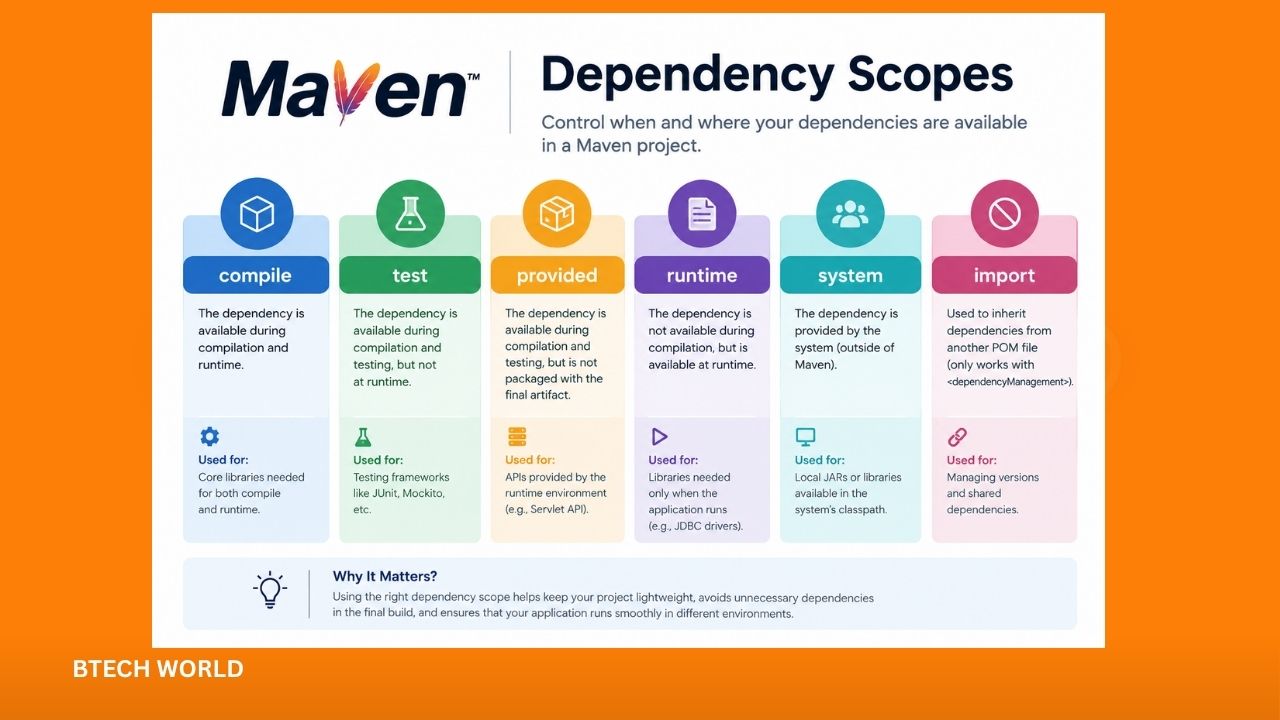
Understanding Maven dependency scopes is essential when working with frameworks, testing tools, database drivers, and external Java libraries. Maven provides several scopes, including compile, provided, runtime, test, system, and import. Each scope serves a different purpose, so knowing their differences makes dependency management easier and more reliable.
What Are Maven Dependency Scopes?
A Maven dependency scope specifies the classpaths where a dependency is available and influences how that dependency is used during different build phases. Developers configure scopes inside the pom.xml file, which stores project dependencies and build settings.
For example, a library used directly by application code usually needs the default compile scope. A testing framework should normally use test, while a database driver that is unnecessary during compilation may use runtime. These choices help Maven determine which libraries belong in different stages of the project lifecycle.
A dependency declaration with an explicit scope looks like this:
<dependency>
    <groupId>com.example</groupId>
    <artifactId>sample-library</artifactId>
    <version>1.0.0</version>
    <scope>compile</scope>
</dependency>
The scope element tells Maven how to treat the dependency. If you omit it, Maven uses compile by default. This default works for many standard application libraries, but other scopes are useful when a dependency has a more specific role.
Understanding the Compile Scope
The compile scope is Maven’s default dependency scope. It makes a dependency available when Maven compiles the main source code, runs tests, and executes the application with the appropriate runtime classpath. Compile dependencies are also generally included in the project’s transitive dependency graph.
Consider a Java application that uses a JSON-processing library to convert objects into JSON. Because the application imports classes from that library in its main source code, the dependency generally needs the compile scope.
<dependency>
    <groupId>com.fasterxml.jackson.core</groupId>
    <artifactId>jackson-databind</artifactId>
    <version>2.18.2</version>
    <scope>compile</scope>
</dependency>
The version shown is an example; projects should select a compatible version that meets their maintenance and security requirements.
Compile scope is suitable for libraries that application code directly requires. Common examples include utility libraries, JSON processors, and core framework components.
However, developers should avoid adding every library with compile scope simply because it works. Dependencies that are needed only for testing or supplied by the deployment environment should use a more appropriate scope.
How the Provided Scope Works
The provided scope is designed for dependencies that are required to compile an application but are expected to be supplied by the runtime environment. Maven makes these dependencies available during compilation and testing, but it does not normally include them in the runtime classpath of the project itself.
A common example is the Servlet API in a traditional web application deployed to a servlet container. The container supplies the Servlet API, so the application generally should not package another copy of it.
<dependency>
    <groupId>jakarta.servlet</groupId>
    <artifactId>jakarta.servlet-api</artifactId>
    <version>6.1.0</version>
    <scope>provided</scope>
</dependency>
This example assumes a compatible Jakarta Servlet environment. The required API version depends on the target server and framework.
Provided scope can also be useful for APIs supplied by application servers or certain development platforms. It helps prevent duplicate libraries from being packaged into an application.
However, the scope does not install or supply the dependency automatically. Developers must ensure that the actual deployment environment contains a compatible implementation. If the required library is missing at runtime, the application may fail with class-loading errors.
Maven Runtime Scope Explained
The runtime scope is useful when a dependency is unnecessary for compiling the project’s main source code but is needed when the application runs or when tests execute. Maven includes runtime dependencies on the runtime and test classpaths, while excluding them from the main compilation classpath.
A database driver is a common example. Application code may use JDBC interfaces provided by the Java platform without importing classes from a particular database driver. The driver is still required when the application connects to the database.
<dependency>
    <groupId>org.postgresql</groupId>
    <artifactId>postgresql</artifactId>
    <version>42.7.5</version>
    <scope>runtime</scope>
</dependency>
This configuration illustrates a PostgreSQL JDBC driver declared for runtime use. Select a maintained version compatible with the Java version and database environment.
Runtime scope keeps implementation-specific libraries out of the main compilation classpath. It can also make the dependency configuration clearer by separating APIs used in source code from implementations required during execution.
Still, runtime scope is not appropriate for every library used after compilation. If application source code imports classes from a library, that library generally needs to be available during compilation.
What Is the Test Scope?
The test scope is intended for dependencies that are required only to compile and run tests. These dependencies are available on the test compilation and execution classpaths, but they are not included in the main application’s runtime classpath.
Testing frameworks such as JUnit are common examples. Developers use them to write unit tests, verify application behavior, and detect regressions without making testing libraries part of the production application.
<dependency>
    <groupId>org.junit.jupiter</groupId>
    <artifactId>junit-jupiter</artifactId>
    <version>5.11.4</version>
    <scope>test</scope>
</dependency>
The example uses JUnit Jupiter for testing. The actual version should align with the project’s testing setup and build configuration.
Test scope is also suitable for mocking libraries, test data generators, and other utilities that are unnecessary when the application runs in production. Keeping these dependencies separate helps reduce the production dependency footprint and makes the project’s purpose clearer.
One important distinction is that test dependencies are not available to the main application source code. If a class in src/main/java imports a library that has only test scope, Maven will generally fail to compile that class.
Maven Dependency Scopes Compared
The main scopes differ in how Maven exposes dependencies during compilation, testing, and execution.
| Scope | Main compilation | Test compilation | Runtime use | Typical purpose |
|---|---|---|---|---|
compile | Yes | Yes | Yes | Libraries required by application code |
provided | Yes | Yes | Not on the project’s normal runtime classpath | APIs supplied by the runtime environment |
runtime | No | Yes | Yes | Runtime implementations, such as JDBC drivers |
test | No | Yes | Test execution only | Testing frameworks and test utilities |
system | Yes | Yes | Available through the configured local path | Local JARs; generally discouraged |
import | Not a normal library scope | Not applicable in the usual sense | Not applicable | Importing dependency-management entries from a BOM |
These descriptions summarize the usual behavior for standard Maven project builds. Actual packaging and deployment behavior can vary with plugins, project types, and the runtime environment.
Understanding System Scope
The system scope resembles provided in that the dependency is not resolved from the normal Maven repositories. Instead, the project must specify a local filesystem path through the systemPath element.
For example:
<dependency>
    <groupId>com.example</groupId>
    <artifactId>legacy-library</artifactId>
    <version>1.0</version>
    <scope>system</scope>
    <systemPath>${project.basedir}/lib/legacy-library.jar</systemPath>
</dependency>
This example assumes the JAR exists at the specified location. Maven does not download it from a repository.
System scope is generally discouraged because it ties the build to a particular file layout. Other developers and build servers may not have the same file, which can make the project difficult to reproduce. A better approach is usually to publish the library to a Maven repository or install it into a suitable local repository for development.
What Does Import Scope Mean?
The import scope serves a specific purpose: it allows a project’s dependency management section to import dependency versions from a Maven Bill of Materials, commonly called a BOM.
A BOM is a POM file that centralizes dependency version information. Instead of declaring versions independently for many related libraries, a project can import a BOM and use its managed versions.
<dependencyManagement>
    <dependencies>
        <dependency>
            <groupId>org.springframework.boot</groupId>
            <artifactId>spring-boot-dependencies</artifactId>
            <version>3.4.2</version>
            <type>pom</type>
            <scope>import</scope>
        </dependency>
    </dependencies>
</dependencyManagement>
This is an illustrative Spring Boot BOM declaration. The version should match the application’s chosen release and compatibility requirements.
Import scope is valid for dependencies of type pom within dependencyManagement. It does not add the BOM itself as an ordinary library on the application’s classpath. Instead, Maven uses its dependency-management entries to help determine versions for dependencies declared elsewhere in the project.
How Dependency Scopes Affect Transitive Dependencies
A transitive dependency is a library that your project receives because another dependency requires it. Maven resolves these relationships automatically, but scopes influence which dependencies are passed along to projects that depend on yours.
For example, if your project uses a compile-scoped library, some of its transitive dependencies may also become available to your project. If a dependency is declared with test scope, it is not normally propagated as a regular compile or runtime dependency to downstream projects.
Scope combinations can affect the resulting dependency graph. Therefore, a library’s declared scope does not always tell the whole story about every dependency Maven resolves. When a project has unexpected libraries or missing classes, inspect the effective dependency tree rather than changing scopes at random.
You can use the following command to inspect resolved dependencies:
mvn dependency:treeThis command displays the dependency hierarchy and can help identify which library introduces a particular transitive dependency. It is especially useful when resolving version conflicts, investigating unexpectedly large builds, or understanding why a class is unavailable.
Common Mistakes When Choosing Maven Scopes
One frequent mistake is assigning test scope to a library that production code actually uses. The project may fail during compilation because the dependency is missing from the main source classpath. Developers should check where the library is imported before choosing a scope.
Another mistake is using provided for a dependency without confirming that the target environment supplies it. A project can compile successfully but fail after deployment if the expected API or implementation is missing.
Developers also sometimes use compile for every dependency. Although this can work, it may place unnecessary libraries in the runtime dependency graph and make the application’s packaging less efficient. Test frameworks, for example, should usually remain test-scoped.
Finally, relying on system scope can cause problems when moving a project to another computer or build server. Prefer repository-based dependency management whenever possible, and use mvn dependency:tree to understand the final result.
Best Practices for Managing Maven Dependency Scopes
Start by identifying when each library is needed. If the main source code imports the library, choose a scope that supports compilation. If the dependency is only needed by tests, use test. If it is a runtime implementation that main source code does not directly reference, runtime may be appropriate.
Use provided only when the deployment platform genuinely supplies the required dependency. Confirm compatibility between the dependency version and the server or framework. This is especially important for application servers and web APIs, where mismatched versions can lead to runtime errors.
Keep dependency versions consistent through dependencyManagement or a suitable BOM when working with a larger application. Review transitive dependencies periodically, update libraries responsibly, and remove unused dependencies to reduce maintenance and security risks.
For troubleshooting, inspect the dependency tree and test the application in an environment that resembles production. A successful compilation alone does not prove that every runtime dependency is available.
Conclusion
Maven dependency scopes help developers manage when Java libraries are available during compilation, testing, and application execution. The compile scope suits most libraries used directly by application code, while provided is useful for dependencies supplied by the runtime environment. The runtime scope fits libraries needed during execution but not main compilation, and test keeps testing tools separate from production code.
The system scope can create portability problems, while import helps centralize dependency versions through a BOM. By selecting scopes carefully, reviewing transitive dependencies, and testing deployment configurations, developers can build Java projects that are easier to maintain and more reliable.
Frequently Asked Questions
1. What is the default Maven dependency scope?
The default scope is compile. Maven uses it when a dependency declaration does not specify a scope.
2. What is the difference between compile and runtime scope?
Compile dependencies are available when Maven compiles main source code and are also available during testing and runtime. Runtime dependencies are excluded from the main compilation classpath but are available during test compilation, test execution, and application runtime.
3. When should I use provided scope in Maven?
Use provided when a dependency is needed to compile the application but is expected to be supplied by the deployment environment, such as a compatible servlet container.
4. Are test-scoped dependencies included in production?
Test-scoped dependencies are not normally included in the application’s runtime dependency classpath or packaged as regular production dependencies. They are intended for test compilation and execution.
5. How can I check Maven dependency scopes?
Run mvn dependency:tree from the project directory. The command displays the resolved dependency hierarchy and helps you investigate dependency relationships and scope-related issues.
Explore More BTECH WORLD