Proxies Bypass Explained: How Proxy Servers Help Access Restricted Content

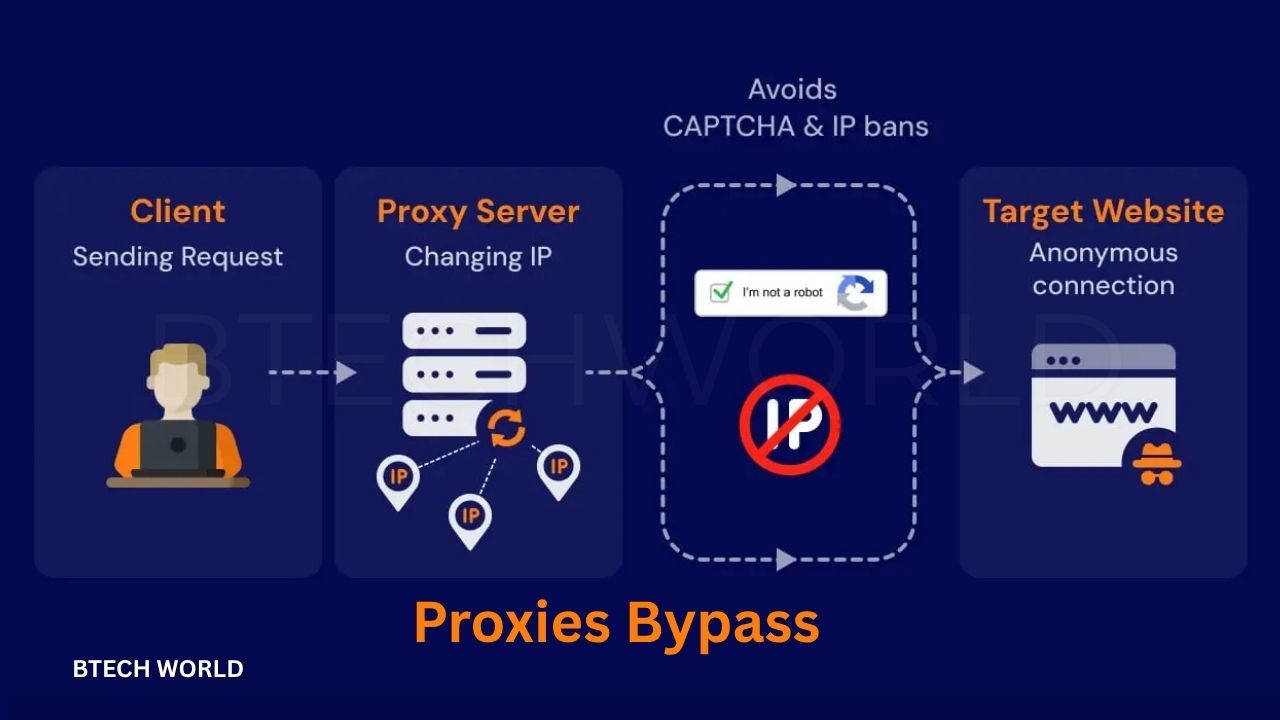
Proxies bypass technology helps users access online content that may be restricted by networks, websites, or geographic limitations. A proxy server works as an intermediary between a user’s device and the destination website. Instead of connecting directly, the user’s request passes through the proxy, which forwards it to the website and returns the response.
People use proxy servers for different reasons, including privacy, network testing, research, and accessing legitimate content that is unavailable on their current network. However, proxies do not guarantee complete anonymity or unrestricted access. Their effectiveness depends on the proxy type, the website’s security measures, and the rules governing the network.
Understanding how proxies bypass restrictions can help users make informed decisions about online access, privacy, and security. It also explains why some proxies work for particular websites while others fail.
What Does Proxies Bypass Mean?
Proxies bypass refers to using a proxy server to route internet traffic through a different connection. This can change the public IP address that a destination website sees and may help users reach content blocked by basic network rules.
For example, a school, office, or public Wi-Fi network might restrict access to certain websites. A proxy may route a request through another server, potentially avoiding a restriction that relies only on the original connection’s IP address or simple filtering rules.
However, not all restrictions work this way. Websites may use account permissions, browser checks, device identification, advanced firewalls, or regional licensing systems. A proxy cannot automatically overcome every barrier, and some services actively detect and block proxy traffic.
The term also covers several different tools. Web proxies operate through a browser interface, while residential and datacenter proxies route traffic through different types of IP addresses. VPNs are related but work differently because they generally encrypt and route traffic from the device or operating system through a secure tunnel.
How Do Proxy Servers Work?
A proxy server sits between a user’s device and the website they want to visit. It receives a request, forwards it to the destination, and sends the response back to the user. Depending on its configuration, the proxy may also apply filtering, caching, authentication, or traffic-management rules.
Step 1: The User Sends a Request
When someone enters a website address, their browser prepares a request to access that page. If a proxy is configured, the request goes to the proxy server rather than directly to the destination website.
The proxy may receive information about the requested website and the connection. The exact details depend on the proxy protocol, browser settings, and whether the connection uses encryption.
Step 2: The Proxy Forwards the Request
The proxy server processes the request and sends it to the destination. The website generally sees the proxy’s public IP address as the connecting address, although other information may reveal that a proxy is being used.
This can be useful when testing websites from different network locations or managing connections for legitimate business purposes. However, it does not necessarily hide the user’s identity from every service involved.
Step 3: The Website Returns Its Response
The destination website sends the requested page or data back to the proxy. The proxy then forwards that response to the user’s device.
Some proxies cache frequently requested content, which can reduce loading times in specific situations. Others focus on access management, security monitoring, or routing traffic through approved network locations.
Step 4: Access Depends on the Restriction
If a restriction relies on the original IP address, using a proxy may change the result. If the website checks account permissions, device details, authentication status, or other signals, the proxy might not help.
This is why proxies bypass is not a universal solution. The outcome depends on how the destination or network enforces its access policies.
Common Types of Proxy Servers
Different proxy types serve different needs. Choosing an appropriate option requires understanding their performance, privacy characteristics, and limitations.
Web Proxies
A web proxy allows users to visit supported websites through an online interface. Users typically enter a web address, and the service retrieves the requested page.
These services can be convenient for occasional browsing, but they may support only certain websites or page features. Some may also display advertisements, collect browsing data, or expose users to unsafe content. Avoid entering passwords, financial information, or other sensitive details through an unfamiliar web proxy.
Datacenter Proxies
Datacenter proxies use IP addresses associated with data centers and hosting providers. They often provide fast connections and can be useful for website testing, automated quality checks, and other authorized technical tasks.
Their IP addresses may be easier for websites to identify as proxy traffic. As a result, some platforms restrict or challenge connections from datacenter networks.
Residential Proxies
Residential proxies use IP addresses associated with residential internet connections. They can help businesses test how websites appear across different locations and network environments.
Residential proxy services vary in transparency, consent practices, reliability, and pricing. Users should choose providers that explain how their networks operate and how IP addresses are obtained. A residential IP address does not automatically make a connection private or trustworthy.
Transparent Proxies
Transparent proxies can process traffic without requiring users to configure a conventional proxy setting. Organizations may use them for content filtering, caching, monitoring, and network administration.
Because they are often managed by the network operator, they do not necessarily provide a way around restrictions. In some cases, they are the mechanism that enforces those restrictions.
Anonymous Proxies
Anonymous proxies attempt to reduce the amount of identifying connection information disclosed to a destination website. However, the level of anonymity varies by provider and configuration.
Some proxies reveal that they are proxies, while others may disclose information through request headers or other technical signals. Users should not assume that a proxy makes their identity impossible to trace.
Why Do People Use Proxies Bypass?
Proxy servers support a range of legitimate activities. Their value depends on the user’s goal and whether the service is appropriate for that purpose.
Accessing Legitimately Available Content
Some websites restrict access based on network location or local filtering rules. A proxy may help users reach content when the restriction is based on a technical condition that the proxy changes.
However, geographic restrictions may reflect licensing agreements, local laws, or service policies. Users should check the relevant terms before attempting to access restricted material.
Protecting Public-Facing IP Information
A proxy can prevent a destination website from seeing the user’s original public IP address in a basic connection. Instead, the website usually sees the proxy’s IP address.
This provides a limited layer of separation, not complete anonymity. The proxy provider may still see connection information, and websites may identify users through logged-in accounts, cookies, browser characteristics, or other tracking methods.
Testing Websites and Applications
Developers and digital marketing teams may use proxies to test how websites behave across different networks and locations. This can reveal regional display issues, performance differences, or configuration problems.
For example, a company might check whether its website loads correctly for customers in different markets. These tests can help improve reliability and user experience without requiring a team to travel to every location.
Managing Business Networks
Organizations sometimes use proxy servers to enforce browsing policies, monitor traffic, block malicious destinations, and manage bandwidth. These functions can improve network visibility and help administrators apply consistent security rules.
In this context, proxies are primarily management tools rather than methods for bypassing restrictions.
Proxies Bypass vs. VPN: What Is the Difference?
Proxies and virtual private networks both route traffic through another server, but they differ in their typical scope and security features.
A conventional proxy may handle traffic from a particular application or browser. A VPN generally creates an encrypted tunnel for supported device or system traffic. The exact coverage depends on the VPN software and its configuration.
| Feature | Proxy Server | VPN |
|---|---|---|
| Main function | Routes selected traffic through another server | Routes supported traffic through an encrypted tunnel |
| IP address visibility | Often shows the proxy’s IP address to the destination | Often shows the VPN server’s IP address |
| Encryption | Depends on the connection and proxy setup | Usually encrypts traffic between the device and VPN server |
| Coverage | May apply to one application or connection | Commonly covers multiple applications |
| Performance | Can be fast, depending on the provider | Depends on server distance, encryption, and network quality |
| Privacy | Depends heavily on the provider and configuration | Depends on the provider, logging policy, and configuration |
| Best use cases | Testing, routing, caching, and specific application needs | Secure connections on untrusted networks and broader traffic protection |
Neither option guarantees complete privacy. A proxy may be suitable for a limited technical task, while a VPN may be more appropriate when a user needs encrypted traffic between their device and a remote server.
Users should also understand that HTTPS protects data in transit between the browser and a website. A proxy does not automatically make an insecure website safe, and a VPN does not prevent every form of tracking or malicious activity.
Benefits of Using Proxy Servers
Proxy servers offer several practical advantages when users choose reliable services and configure them correctly.
Different Network Routes
A proxy provides an alternative route for supported internet requests. This can help administrators test network behavior or investigate connection problems without changing the entire device’s internet configuration.
IP Address Separation
Websites often see the proxy’s IP address instead of the user’s original public IP address. This can reduce direct exposure of that address to the destination, although it does not eliminate other ways of identifying or tracking users.
Caching and Performance
Some proxies store copies of frequently requested resources. When caching is appropriate, users may receive content more quickly and organizations may reduce repeated network traffic.
The performance benefit is not guaranteed. A distant or overloaded proxy can slow connections, and many modern websites serve personalized or frequently changing content that limits caching opportunities.
Centralized Access Management
Businesses and educational institutions can use proxies to apply browsing policies and monitor network activity. Administrators can block harmful destinations, control access, and investigate potential security incidents.
These controls are most effective when combined with clear policies, secure configurations, and other network protections.
Risks and Limitations of Proxies Bypass
Although proxies can be useful, choosing an unreliable provider may create serious privacy and security problems.
Data Collection and Privacy Concerns
A proxy provider may be able to observe connection metadata and, depending on the setup, some of the content passing through its service. Free services may collect information for advertising, analytics, or other commercial purposes.
Before using a proxy, review the provider’s privacy policy, data-retention practices, ownership information, and security features. Avoid services that make unrealistic promises about anonymity or do not explain how they handle user information.
Malware and Unsafe Websites
Some proxy websites contain deceptive advertisements, malicious redirects, or downloads that imitate legitimate tools. A proxy service itself can also be poorly maintained or compromised.
Use reputable providers, keep your browser updated, and avoid installing unknown extensions or applications. Do not ignore browser security warnings simply because a website is being accessed through a proxy.
Account Restrictions
Online platforms may block known proxy addresses or require additional verification when they detect unusual traffic. Repeated attempts to bypass access controls may violate a service’s terms and could lead to account restrictions.
If access is blocked, the safest approach is to check the service’s official guidance or contact its support team.
Limited Encryption
A proxy is not necessarily an encryption service. If a connection does not use HTTPS or another appropriate security protocol, information may be exposed while travelling across parts of the network.
Even with HTTPS, the proxy may still see certain metadata, such as destination information, depending on the protocol and configuration. Users should understand these limitations before routing sensitive activity through a third party.
Legal and Policy Considerations
The legality of proxy use depends on the country, the purpose, and the activity involved. Using a proxy for ordinary privacy protection or authorized testing is different from using it to commit fraud, access prohibited systems, or violate applicable laws.
Users should follow local regulations, organizational network policies, and the terms of the services they use.
How to Choose a Reliable Proxy Provider
Choosing a proxy should involve more than comparing advertised speed or price. The provider’s security practices and transparency are equally important.
First, identify the task. Occasional website testing may require a different proxy than business network management. A simple browsing task may not justify paying for a large proxy network.
Next, investigate the provider’s reputation and privacy policy. Look for clear information about data collection, retention, security controls, customer support, and the source of its IP addresses. A trustworthy provider should explain its service without making absolute claims about anonymity.
Performance also matters. Consider connection speed, uptime, server availability, and compatibility with the applications you need. If a provider offers a trial, test it using non-sensitive tasks before relying on it for important work.
Finally, check the terms of service and any usage limits. Choose a provider that permits your intended activity and offers a clear way to report technical or security problems. Avoid services that ask you to disable essential security protections or provide unnecessary personal information.
Best Practices for Using Proxies Safely
A few precautions can reduce common risks when using proxy technology.
- Use trusted providers: Choose services with transparent ownership, clear privacy policies, and a credible operating history.
- Protect sensitive accounts: Avoid entering passwords or payment details through unfamiliar proxy websites.
- Prefer HTTPS: Check that the destination website uses a secure connection before sharing information.
- Review browser permissions: Remove extensions that request excessive access or come from unknown publishers.
- Keep software updated: Security updates help protect your device against known vulnerabilities.
- Respect access policies: Do not use proxies to access systems without authorization or evade legitimate security controls.
- Use stronger protection when needed: Consider a reputable VPN or other approved security solution if your goal requires encrypted traffic across an untrusted network.
- Check for unusual activity: If accounts show unexpected logins or suspicious behavior after proxy use, review account sessions and update credentials through the official website.
These practices do not eliminate every risk, but they help users make more informed choices and avoid common mistakes.
Common Myths About Proxies Bypass
Myth 1: Every proxy bypasses every restriction. In reality, proxies may change the apparent IP address, but they cannot automatically defeat account controls, advanced filtering, or every geographic restriction.
Myth 2: Proxies make users completely anonymous. Websites may still identify visitors through accounts, cookies, browser signals, and other information. Proxy providers may also retain connection records.
Myth 3: Free proxies are always safe. Some free services are legitimate, but others may collect data, display intrusive advertisements, or offer weak security. Cost alone does not establish trustworthiness.
Myth 4: Proxies and VPNs are identical. Both can route traffic through remote servers, but their typical coverage, encryption, and configuration differ.
Myth 5: A proxy always improves speed. Caching and efficient routing can help in some cases, but server distance, congestion, and provider quality may reduce performance.
Understanding these differences helps users select tools based on actual needs rather than marketing claims.
Conclusion
Proxies bypass technology can help users route internet traffic through alternative servers, change the IP address visible to destination websites, test regional website behavior, and manage network access. Its usefulness depends on the proxy type, provider reliability, and the restrictions involved.
However, proxies do not guarantee anonymity, encrypt every connection, or provide access to every restricted website. Privacy policies, security settings, website rules, and local regulations all matter when choosing how to use them.
For everyday users, the best approach is to select a reputable service that matches the intended task and to avoid routing sensitive information through unfamiliar providers. Used responsibly, proxy servers can be useful networking tools without being treated as a complete solution for online privacy or unrestricted access.
Frequently Asked Questions
Q1. What is Proxies Bypass?
Proxies bypass refers to routing internet requests through a proxy server to change how a destination website or network sees the connection. It may help with certain IP-based restrictions, but it does not defeat every access control.
Q2. Are proxy servers safe to use?
Proxy servers can be safe when provided by reputable services with clear privacy policies and appropriate security measures. Unknown providers may collect browsing data, expose connection information, or display malicious content.
Q3. Can a proxy server hide my IP address?
A proxy typically makes its own public IP address visible to the destination website instead of the user’s original public IP address. However, websites may still identify users through accounts, cookies, and other signals.
Q4. Is a proxy better than a VPN?
Neither is universally better. Proxies can be useful for specific applications, website testing, and traffic routing. VPNs generally provide an encrypted tunnel for supported device traffic, making them more suitable for many privacy and public Wi-Fi security needs.
Q5. Can proxies bypass all blocked websites?
No. A proxy may work when a restriction depends on an IP address or basic network rule, but advanced filtering, account requirements, geographic licensing, and other security measures may still prevent access. Users should follow applicable laws and service policies.
Explore More BTECH WORLD