
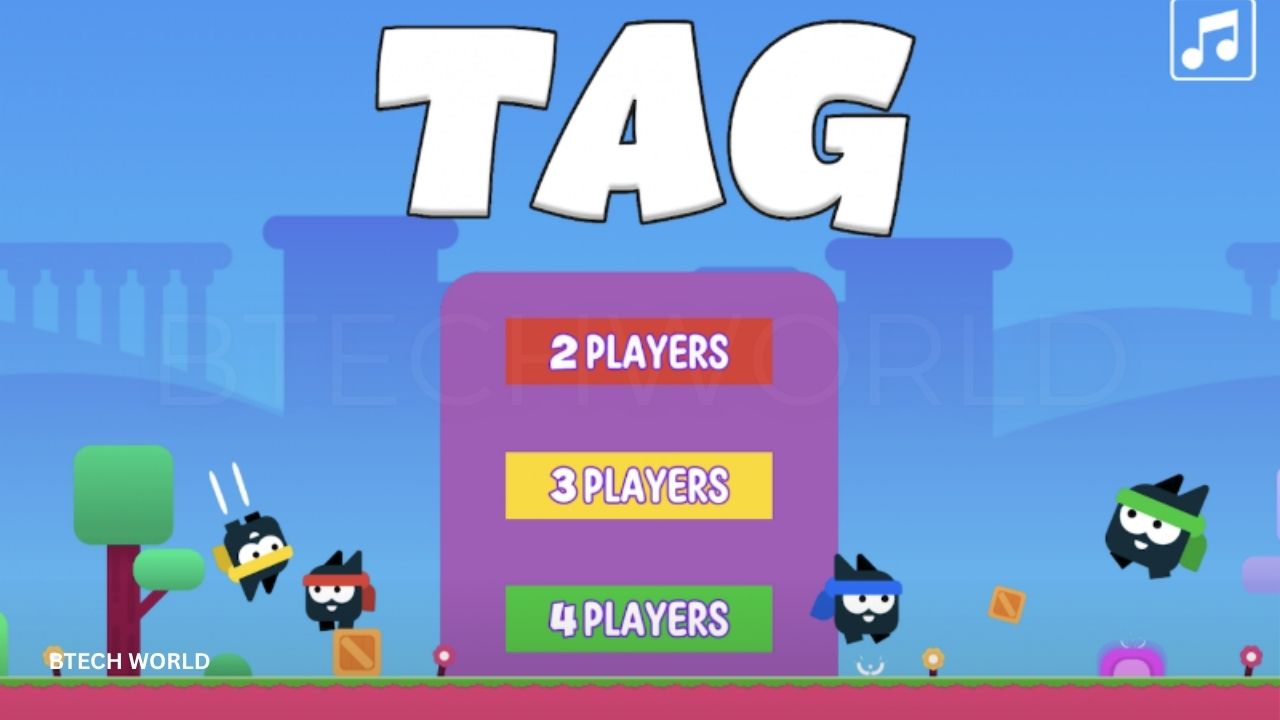
Tag Game Unblocked Everything You Need to Know

Tag Game Unblocked is a browser-based multiplayer game built around a simple idea: one player chases the others while everyone else tries to escape. Unlike many modern online games that require large downloads or complicated progression systems, Tag focuses on quick matches, simple controls, and local multiplayer fun. Current versions of the game describe support for two to four players on the same device, with players switching between the roles of tagger and runner during matches.
The word “unblocked” is commonly used by third-party gaming websites to describe browser versions that are easy to access, rather than being an official game mode created by the developer. Several sites currently host or describe Tag as an HTML5 browser game, while different versions may provide slightly different menus, maps, graphics, or features. Players should therefore distinguish the game itself from unofficial mirrors and follow the rules of the network or device they are using.
What Is Tag Game Unblocked?
Tag Game is a local multiplayer chase game in which players move around an arena and attempt to avoid being tagged. At the beginning of a round, one player becomes the tagger while the remaining players become runners. The tagger must catch another player, and the tagged player then takes over the chasing role. This simple system creates constantly changing gameplay because players have to react to who currently has possession of the tag.
The browser format makes the game particularly convenient for short multiplayer sessions. Current listings describe Tag as playable directly in a web browser, without a traditional large installation. Some versions support desktop browsers and local keyboard play, while other hosts describe mobile or tablet compatibility. Because third-party websites can distribute different versions, the exact device support and controls may vary, so the game instructions shown on the selected host should be checked before starting a match.
How Does Tag Game Work?
The main objective is different depending on the role. The tagger needs to catch another player before time runs out, while runners need to stay away from the tagger and use the map to create distance. Some versions also include environmental features such as bounce platforms, teleportation points, or shortcuts, which give players additional ways to escape or intercept opponents. These features turn a basic chase into a game of movement, timing, and positioning.
A round can become more intense as players learn the layout of the arena. A runner who understands where shortcuts and teleport points are located can make an escape at the last second, while a tagger can use the same knowledge to predict where someone is likely to move. This creates a simple but effective strategy layer. Players are not simply running randomly; they are constantly deciding when to turn, jump, change direction, or take an alternative route.
Tag Game Multiplayer Features
One of the main attractions of Tag is its support for local multiplayer. Current descriptions commonly identify two, three, or four-player matches, allowing several people to share one computer and compete in the same arena. This makes the game different from many browser titles that are designed primarily around solo play or online matchmaking. The shared-screen format can make even short rounds entertaining because every player can immediately see how the others are moving.
The role-switching mechanic also keeps multiplayer matches unpredictable. Once a player is tagged, the balance of the round changes immediately because the new tagger starts chasing everyone else. Players therefore need to pay attention not only to the person currently chasing them but also to the next position they want to reach. In a four-player game, this can create several simultaneous escape routes and make the match much more chaotic than a simple two-player chase.
Tag Game Controls
The controls are designed to remain simple enough for several people to play on one keyboard. One current version lists W, A, and D for Player 1, while Player 2 uses the arrow keys. Player 3 uses I, J, and L, and Player 4 uses T, F, and H. These mappings allow multiple players to control their characters simultaneously without needing separate computers.
The most important ability is usually movement and jumping. Since the game is centered on evasion and pursuit, players need to develop quick reactions to changes in direction. The exact control layout can differ between browser versions, so a player should check the instructions displayed by the particular game host. If a keyboard layout feels uncomfortable, choosing a different version or using any supported controller option can make multiplayer sessions easier.
Tag Game Maps and Environments
Current versions and descriptions mention multiple maps and themed environments. Some sources describe three main maps, while other hosts present additional or differently arranged arenas. Reported environments include settings such as grassy areas, winter-themed stages, and desert or Egyptian-inspired locations. Interactive elements can include platforms, hazards, shortcuts, or teleportation features that affect how players move around the arena.
Map knowledge is one of the biggest advantages experienced players can develop. Knowing where a shortcut leads or where a teleport point connects can help a runner escape when the tagger gets close. The same knowledge can benefit the tagger by allowing them to predict escape paths. Over time, players naturally begin memorizing safe areas, dangerous corners, and efficient movement routes.
Power-Ups and Special Features
Some current versions of Tag include optional buffs or power-ups. One published version describes settings that can turn buffs on or off and gives examples such as speed boosts and temporary invisibility. These features change the balance of the chase and can create sudden opportunities for either the runner or the tagger.
Power-ups make each round less predictable because players cannot always depend on exactly the same movement pattern. A runner may gain enough speed to escape from a difficult position, while a tagger may receive a temporary advantage that makes a previously safe route dangerous. For players who prefer a straightforward experience, versions with buffs disabled can provide a more skill-focused format based primarily on movement and map knowledge.
Time Limits in Tag Game
Another feature found in current versions is a selectable match timer. One Tag listing describes 60-, 120-, and 180-second options, allowing players to choose how long a round should last. A shorter timer creates faster decisions, while a longer round gives players more time to explore the map and use its features.
The timer also affects strategy because players have different priorities at different stages of a match. Early in the round, a runner may focus on creating distance and learning the tagger’s location. Near the end, the objective becomes simply surviving until the clock reaches zero. A tagger, on the other hand, may become more aggressive as the remaining time decreases.
How to Play Tag Game Unblocked
To play a browser version of Tag, players generally open a compatible website, allow the game to load, and select the desired number of players. A current Tag game site describes the title as browser-based and intended for two to four players on the same device.
The phrase “unblocked” can have different meanings depending on the website. Some third-party sites use it as a search-oriented label for games that they claim can be accessed without restrictions, but players should still respect school, workplace, library, family, or network policies. A game being labeled “unblocked” online does not automatically mean that bypassing a network administrator’s restrictions is permitted. A legitimate alternative is to use the game on a personal device or network where gaming is allowed.
Why Is Tag Game Popular?
The biggest reason for Tag’s appeal is its simplicity. New players can understand the objective almost immediately: avoid the tagger or catch another player. There is no large collection of complicated systems to learn before the first match, which makes the game suitable for casual sessions with friends and family. The local multiplayer format also creates direct competition because everyone is playing together on the same screen.
Another advantage is the short match structure. Players do not have to commit to a long gaming session to enjoy a round. A few minutes can be enough for several matches, making Tag suitable for quick breaks or casual multiplayer gatherings. The combination of simple rules, short rounds, shared controls, and unpredictable role changes helps explain why the game continues to appear on browser-game portals.
Tips for Playing Tag Game
The first useful tip is to avoid running in a predictable straight line. A tagger can often anticipate where a runner is heading if the runner continues moving in the same direction. Changing direction at the right moment, jumping over obstacles, or using a shortcut can create enough separation to escape. Good movement is less about running constantly and more about controlling where the opponent expects you to go.
Map knowledge is equally important. Players who understand teleport locations, platforms, and shortcuts can make faster decisions during a chase. It is useful to explore the arena during early matches instead of concentrating only on winning. Once players know the map, they can start planning routes several seconds ahead instead of reacting only after the tagger gets close.
Strategies for the Tagger
Playing as the tagger requires a different mindset. Instead of chasing the closest player without a plan, try to predict where runners are moving. Cutting off a route can be more effective than following directly behind someone. If the map contains multiple paths or teleport points, use them to reduce the distance between yourself and the target.
Another useful strategy is to stay patient. Runners may make mistakes when they become nervous or attempt an overly complicated escape. Rather than wasting time making constant sharp turns, the tagger can wait for an opening and move toward the area where the runner is most likely to appear. Understanding the arena often matters more than raw speed.
Strategies for Runners
Runners should pay attention to both their own position and the tagger’s location. The safest route is not always the shortest route. Moving toward an area with multiple exits can provide more options if the tagger suddenly appears. Open spaces may offer better visibility, while tighter areas can either help or hurt depending on the map layout.
Another important technique is controlled movement. Constantly changing direction without a purpose can make it harder to respond when the tagger closes in. Strong runners often create a plan, such as moving toward a teleport point or a platform, and then changing direction at the last moment. This makes their movement harder to predict while preserving a clear escape route.
Tag Game on PC and Chromebook
A desktop computer or laptop is generally the best environment for the full local multiplayer experience because the game relies heavily on keyboard controls. Multiple players can share one keyboard, with each person using a different group of keys. This arrangement works particularly well for quick local matches where everyone sits around the same screen.
Some browser listings also describe Tag as compatible with Chromebooks and other browser-based devices. However, performance depends on the browser, hardware, screen size, and the particular host being used. If several players are sharing one keyboard, a larger physical keyboard can also make simultaneous inputs easier than using a compact laptop layout.
Tag Game on Mobile Devices
Mobile compatibility depends on the version being hosted. Some third-party listings categorize Tag as available on mobile and tablet browsers, while other versions are clearly designed around shared keyboard controls. For a true two- to four-player local match, a desktop keyboard may still provide a more practical control setup.
If a mobile version is available, players should check whether it uses touch controls or another input method. Touch gameplay can work for single-player or adapted versions, but multiple people sharing one phone is less convenient than using a computer. Mobile performance can also vary depending on browser compatibility and the hardware’s ability to run HTML5 games smoothly.
Is Tag Game Unblocked Safe to Play?
The game itself and the website hosting it should be considered separately. Tag is a lightweight browser title, but an unofficial website can add advertisements, redirects, tracking scripts, or other content that is unrelated to the original game. Players should therefore pay attention to the domain they are visiting and avoid pages that request unnecessary personal information.
A safer approach is to use reputable game portals, official or established developer pages where available, and a browser with current security protections. Players should not install unknown software or browser extensions merely to start a simple HTML5 game. They should also avoid entering passwords, payment information, or other sensitive data into an untrusted game site.
Is Tag Game Free?
Current browser listings generally advertise Tag as a free-to-play browser game. Some hosts describe it as requiring no installation or login, allowing players to start directly in the browser. However, the experience can vary because third-party websites may use advertisements or different hosting arrangements.
Free access also does not mean that every site carrying the game is equally trustworthy. Players should check whether the page is simply loading the game or trying to push unrelated downloads. When a browser game suddenly requests unusual permissions, software installation, or sensitive account information, leaving the page is usually the safer choice.
Tag Game Unblocked vs Other Browser Games
Compared with racing, puzzle, or shooting games, Tag has a particularly strong local multiplayer focus. Its main challenge comes from human opponents rather than complicated artificial intelligence or long progression systems. The changing tagger role ensures that the match remains active, while different maps add variety without making the basic objective difficult to understand.
The game also benefits from being relatively lightweight. Players looking for a fast browser experience do not have to learn a large inventory system, character tree, or extensive campaign before enjoying it. That simplicity makes Tag different from many larger multiplayer games and explains why browser portals continue to categorize it as an accessible casual multiplayer title.
Common Mistakes Beginners Make
A common mistake is focusing only on the tagger. Runners sometimes watch the person chasing them so closely that they fail to notice where they are actually moving. Keeping awareness of the surrounding environment is important because a shortcut, platform, or teleport point can completely change the safest route.
Another mistake is using the same strategy every round. If a player always runs toward the same platform or always chooses the same escape route, opponents will eventually notice the pattern. Mixing up routes makes it harder for the tagger to predict movement. Similarly, taggers should not always attack from the same direction when multiple routes are available.
Is Tag Game Good for Casual Multiplayer?
Tag works particularly well for casual multiplayer because the rules can be understood quickly and matches do not require a significant time commitment. Two players can start a simple chase, while three or four players create more complicated situations in which several people may be trying to escape simultaneously.
It can also work well for family or friend groups because the competitive structure is easy to explain. Players do not need extensive gaming experience to participate. The strongest advantage is that everyone can learn by playing, with each round naturally teaching movement, map awareness, and timing.
Final Thoughts on Tag Game Unblocked
Tag Game Unblocked offers a simple but surprisingly competitive browser experience built around chasing, escaping, timing, and map awareness. Its support for two to four local players makes it particularly suitable for friends or family members who want a quick game without learning a complicated control system. The addition of different environments, shortcuts, teleportation features, and optional buffs can provide more variety than the basic rules might initially suggest.
The term “unblocked” should still be treated carefully because it generally comes from third-party hosting websites rather than being an official feature of the game. Players should respect school and workplace network policies, use trustworthy websites, and avoid downloading suspicious software just to access a browser game. For casual multiplayer fans, however, Tag remains an accessible example of how a very simple chase mechanic can become entertaining through fast decisions and direct competition.
Frequently Asked Questions
What is Tag Game Unblocked?
Tag Game Unblocked generally refers to browser-hosted versions of the Tag multiplayer chase game that are promoted as being easy to access online. The term “unblocked” is usually used by third-party game sites rather than as an official game mode.
How many players can play Tag Game?
Current versions commonly support two to four local players on the same computer. Different players are assigned separate keyboard controls, allowing everyone to compete in the same match.
What are the controls for Tag Game?
One current control layout uses W, A, and D for Player 1; arrow keys for Player 2; I, J, and L for Player 3; and T, F, and H for Player 4. Other versions may use different mappings.
Can I play Tag Game online without downloading it?
Yes, current browser versions are designed to run directly through a compatible web browser. Depending on the host, no traditional software installation may be necessary.
Does Tag Game have power-ups?
Some versions include optional buffs such as speed boosts and temporary invisibility. A current listing also describes settings that allow buffs to be turned on or off.
How long does a Tag Game match last?
Some versions provide 60-, 120-, and 180-second timer settings. The available options can vary depending on the version or hosting site.
Can I play Tag Game on mobile?
Some current listings describe browser support for mobile and tablets, but the classic local multiplayer experience is mainly designed around keyboard controls. Desktop or laptop play may therefore be more convenient for four-player matches.
Is Tag Game Unblocked safe?
The safety of the game and the safety of the hosting website are separate questions. Players should use reputable sources, avoid suspicious downloads and extensions, and never provide sensitive account information to an untrusted game site.
Can I play Tag Game with friends?
Yes. The game’s core format is local multiplayer, allowing two to four people to compete on the same device using separate controls.